Thanks…got it sorted and then the stupid web site wouldn’t let me proceed (for reasons other than the pic)
2 Likes
Since this is the helping old people thread…
I had to get a pre paid SIM card with Telstra whilst porting a number. I now want to go to a normal plan where I pay per month.
Do I need a new sim? I’ve tried buying the new plan, but it looks like that’s only if you’re coming from another telco.
Are you old enough to get help on this thread???
Well…are you punk???
1 Like
I’ve qualified for plans like that in the past, by buying a $5 SIM for another brand from the supermarket, churning to that company, then churning back to the Telstra plan
1 Like
The really easy way to get a smaller pic for uploading when it’s oversized, is to simply re-take a photo from further away, and crop down to the size of the passport. Because cropping is so quick and intuitive on a phone, it can often be quicker than compressing a larger image with software.
4 Likes
I am cool to stay with Telstra.
It went like this
Changed jobs, so they let me keep the number, ported the phone to a prepaid sim I purchased. Now I want to get back onto a regular monthly plan.
But what you’re saying is, port to another telco and then port back. Which could probably work.
1 Like
The whole procedure can usually be completed in hours, at worst.
Particularly with Telstra, and I have contracted for multiple Telstra retail and business stores, there are some processes that are difficult, or simply impossible, to do. Some of that is because they’re used to being the big player, so don’t feel they need to be as flexible as others to get business. But some is because they have an entirely different system for business and personal phone plans, which aren’t at all compatible. Even pulling up records for clients isn’t a simple matter, and can often produce multiple accounts for the same customer. A worker less familiar with their systems can easily miss details.
1 Like
Farkin. On iPhone, If I click a link in outlook, it has now started using MS Edge as browser. Can’t figure out how to get it to stop…
Delete Edge
4 Likes
Didn’t even know I had it installed!!
Fkg M$ has viral products. I curse them at least 5 times every day for the bugs they have in their software and their impacts on my Mac just because our fkg stupid University forces us to use their crap products.
1 Like
I don’t know what their policy is nowadays, but all/any MS products used to be priced at $1 per disc if you were a school teacher.
It’s a sound strategy. Make your software the only one used in schools, and graduates grow up only knowing how to use MS.
Hi need some help or advice - please be kind
Whenever we’ve been on overseas trip etc, I normally use Google maps to plan trip and find our way round, catch public tranport find directions etc. No problems in UK and Italy using Google Maps.
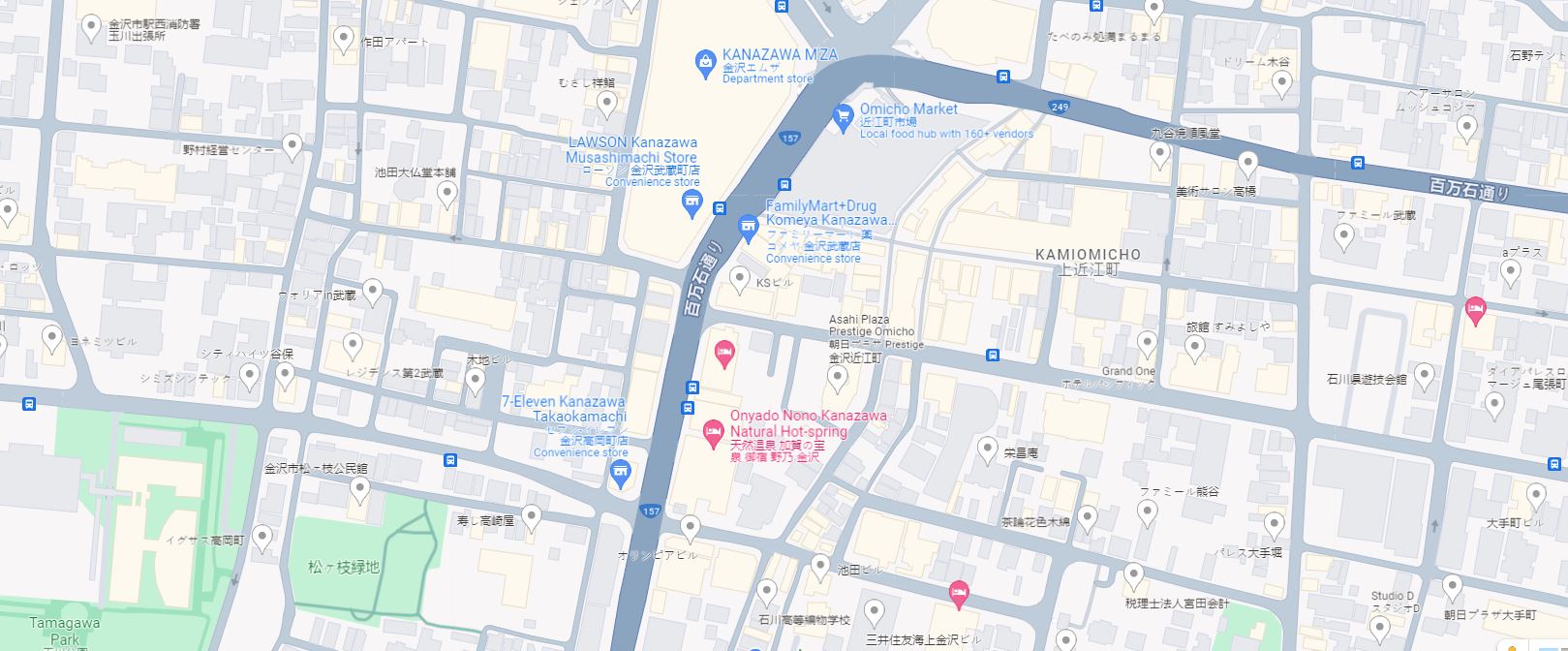
Talking with a friend the other day about their trip Japan and I thought I’d have a look on Google Maps to see what it would look like but everything is in Japanese. I tried changing the language setting, but it’s already in English. The description panel on the left is in English, but the directions to streets, street names etc and the rest of the map area is in Japanese - how do I get it to show in English and get directions etc in English. Snapshot below so you can see. Any ideas would be appreciated.
I started my own only fans page. Doing well as I’m the only fan.
This may be a case of street names not having an English translation.
Take for example Lonsdale St in Melbourne. I can’t imagine any language has a translation for Lonsdale (as it’s a name), so in maps, no matter the language selected, it may show up as Lonsdale St.
Thanks for that, I just imagine it would be difficult when planning a walking route for example, trying to work out what street to go to or what public transport to catch when the directions are in Japanese. We had no drama with our Italy trips, all the directions etc were in English.
Anyway this is just a far away dream of going there one day 
Try Apple Maps, directions are in English
1 Like
Need help to figure out home networking.
I have built a granny flat, and want to get internet out there. The wireless wifi extender I have is pretty flaky, isn’t line of sight, and has to go through multiple walls including bricks. So I’d like to send a cable direct to the granny flat, and put another router out there.
How would this be done…
-
send a cable from the NBN internet box that is attached to the front of the house? I assume I would then need another one of those indoor NBN boxes, and this would be another account/ISP (expensive)
-
send an Ethernet cable from the small NBN box that sits inside the house?
-
send an Ethernet cable out of my house modem router to another router in the granny flat (I think this is called bridging)?
The granny flat isn’t yet plastered, so I think it could be easy to rough in an Ethernet.
From modem to Granny flat.
Throw in a dumb switch on that end for distribution - if you want more ports on that end.
1 Like
Thanks.
I can probably get the landscaper to bury it and run it before the plasterer.
I read about needing a registered cabler…surely the nanny state hasn’t gone this far?