Computer problem

Seeking help from the Blitzperts:

I bought a 64gb Sandisk Ultra Fit (thumb size) USB. When i plug it in it says I need to format it. However Windows formatting does not work and no 3rd party tools will format it either. Anyone have any clue how to fix this?

It always comes back to this: windows was unable to complete the format

Could it be a fake? If you use disk management tool is there a partition?

nope

Only thing I can think of is that NTFS vs the other type of formatting thing, … where it will take files no bigger than almost 4 gig, … or the other way it will take larger ones.

I’ve had a USB that had that problem.

Someone will know what I’m on about. :grin:

What format are you using? For 64GB, try exFAT

Tried to format exfat, still get that error. Tried third party formatting tools, same issue.

image

Try Windows Powershell (Admin)

Then use:
format /FS:FAT32 X: ---- replace X with drive letter

so I assume that would be (see screen shot above)?

“format /FS:FAT32 E:”

My best advice is Listen to Glu! :grin:

Yes

1 Like

It may take awhile (if it works)

@Glu

image

Follow this guide and let me know how you go:

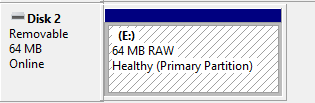
Why does Windows think it’s 64MB, not 64GB?

1 Like

Bricked it mate.

Paperweight

it’s a tiny thumbnail type, it wouldn’t hold down any paper.

1 Like

Could be as simple as the USB type?

Have you tried in alternative ports? Are you going into a HUB??

Most likely the format but just another idea to look into.

USB 2.0 or 3 have compatibility issues

USB 3.1 and tried different ports. I looked it up and this apparently happens to Sandisk (Western Digital owned) USB’s for some reason.

Go get the install software from the manufacturer and install